For now, this is the latest version of the Intel graphics media accelerator driver software that is support for windows 7. Release at 2012/03/28, the version before this is V8.14.8.1064. This driver support for Asus Eee PC 1025C or other laptop with similar graphics device.
Download link : Intel graphics driver latest version
How to install or update driver of computer
Install driver :
TO install driver please follow step by step the following metods :
1. Download driver you want to install
2. Look for setup.exe ( or othe file name with "exe" format ) and double click this file, or if the file you have downloaded "RAR" please double click the "RAR" file and look for file with "exe" format and double click
3. After installing was begin, follow all instruction there, for attention just follow it's instruction.
4. Restart your computer after installation finished.
Update driver :
1. Download driver you want to install and unpack if the file using "RAR" or "ZIP" format
2. Click "Sart" menu and right click "Computer" ( or My Computer )
3. Click "Manage" And Choose "Device manager"
4. Choose what device driver you want to update, right click and choose update driver
5. On the option screen choose the driver file where you have saved it.
6. Click next and follow instruction there to finish.
Latest Driver For P4M900 Via Chrome9 Graphics Device
P4M900 VIA Chrome9 latest driver can be download here.
Driver version : 24.12.01o
Date of release : 18-Januari-2011
File format : ZIP / RAR
File size : 14,4 MB
Support for operating system : Windwos 7 32 bit
Please use the following link to download this P4M900 Via Chrome9 latest driver for free, this driver also support for CN896 VIA Chrome9, VN896 VIA Chrome9 HC graphics device.
Download link
You can download previous version of this driver here
TO install driver please follow step by step the following metods :
1. Download driver you want to install
2. Look for setup.exe ( or othe file name with "exe" format ) and double click this file, or if the file you have downloaded "RAR" please double click the "RAR" file and look for file with "exe" format and double click
3. After installing was begin, follow all instruction there, for attention just follow it's instruction.
4. Restart your computer after installation finished.
Update driver :
1. Download driver you want to install and unpack if the file using "RAR" or "ZIP" format
2. Click "Sart" menu and right click "Computer" ( or My Computer )
3. Click "Manage" And Choose "Device manager"
4. Choose what device driver you want to update, right click and choose update driver
5. On option screen choose the driver file ( have installed ) where you have saved it
6. Click next and follow instruction there.
Driver version : 24.12.01o
Date of release : 18-Januari-2011
File format : ZIP / RAR
File size : 14,4 MB
Support for operating system : Windwos 7 32 bit
Please use the following link to download this P4M900 Via Chrome9 latest driver for free, this driver also support for CN896 VIA Chrome9, VN896 VIA Chrome9 HC graphics device.
Download link
You can download previous version of this driver here
How to install or update driver of computer
Install driver :TO install driver please follow step by step the following metods :
1. Download driver you want to install
2. Look for setup.exe ( or othe file name with "exe" format ) and double click this file, or if the file you have downloaded "RAR" please double click the "RAR" file and look for file with "exe" format and double click
3. After installing was begin, follow all instruction there, for attention just follow it's instruction.
4. Restart your computer after installation finished.
Update driver :
1. Download driver you want to install and unpack if the file using "RAR" or "ZIP" format
2. Click "Sart" menu and right click "Computer" ( or My Computer )
3. Click "Manage" And Choose "Device manager"
4. Choose what device driver you want to update, right click and choose update driver
5. On option screen choose the driver file ( have installed ) where you have saved it
6. Click next and follow instruction there.
Intel GMA 3600 Graphics Latest Driver
The latest driver for Intel Graphics Media Accelerator 3600 Series.
Download Version : 8.0.3.0.1089
File format : .exe
File size : 17,12 MB
Date of Release : 11/12/2012
OS Available : Windows 7 32 bit all type
The file contain : Graphics driver with file name : Win7_1089.exe
>> Download link <<
How to install or update driver of computer
Install driver :
TO install driver please follow step by step the following metods :
1. Download driver you want to install
2. Look for setup.exe ( or othe file name with "exe" format ) and double click this file, or if the file you have downloaded "RAR" please double click the "RAR" file and look for file with "exe" format and double click.
3. After installing was begin, follow all instruction there, for attention just follow it's instruction.
4. Restart your computer after installation finished.
Update driver :
1. Download driver you want to install and unpack if the file using "RAR" or "ZIP" format
2. Click "Sart" menu and right click "Computer" ( or My Computer )
3. Click "Manage" And Choose "Device manager"
4. Choose what device driver you want to update, right click and choose update driver
5. On option screen choose the driver file ( have installed ) where you have saved it
6. Click next and follow instruction there.
Download Version : 8.0.3.0.1089
File format : .exe
File size : 17,12 MB
Date of Release : 11/12/2012
OS Available : Windows 7 32 bit all type
The file contain : Graphics driver with file name : Win7_1089.exe
>> Download link <<
How to install or update driver of computer
Install driver :
TO install driver please follow step by step the following metods :
1. Download driver you want to install
2. Look for setup.exe ( or othe file name with "exe" format ) and double click this file, or if the file you have downloaded "RAR" please double click the "RAR" file and look for file with "exe" format and double click.
3. After installing was begin, follow all instruction there, for attention just follow it's instruction.
4. Restart your computer after installation finished.
Update driver :
1. Download driver you want to install and unpack if the file using "RAR" or "ZIP" format
2. Click "Sart" menu and right click "Computer" ( or My Computer )
3. Click "Manage" And Choose "Device manager"
4. Choose what device driver you want to update, right click and choose update driver
5. On option screen choose the driver file ( have installed ) where you have saved it
6. Click next and follow instruction there.
AMD HD 4000 VGA Latest Driver XP
The latest driver for AMD ATI Radeon VGA. Also, support for AMD Radeon HD 4000, AMD Radeon HD 3000, and AMD Radeon HD 2000 VGA card hard ware.
Download Version : 12.6
File format : .exe
File size : 101,36 MB
Date of Release : 7/24/2012
OS Available : Windows XP
The file contain : OpenCL Driver, AMD Integrated Driver, AMD HDMI Audio Driver, Catalyst Control Center
Please to use the following link to get this new version driver
>> Download link <<
How to install or update driver of computer
Install driver :
TO install driver please follow step by step the following metods :
1. Download driver you want to install
2. Look for setup.exe ( or othe file name with "exe" format ) and double click this file, or if the file you have downloaded "RAR" please double click the "RAR" file and look for file with "exe" format and double click
3. After installing was begin, follow all instruction there, for attention just follow it's instruction. 4. Restart your computer after installation finished.
Update driver :
1. Download driver you want to install and unpack if the file using "RAR" or "ZIP" format
2. Click "Sart" menu and right click "Computer" ( or My Computer )
3. Click "Manage" And Choose "Device manager"
4. Choose what device driver you want to update, right click and choose update driver
5. On option screen choose the driver file ( have installed ) where you have saved it
6. Click next and follow instruction there.
Download Version : 12.6
File format : .exe
File size : 101,36 MB
Date of Release : 7/24/2012
OS Available : Windows XP
The file contain : OpenCL Driver, AMD Integrated Driver, AMD HDMI Audio Driver, Catalyst Control Center
Please to use the following link to get this new version driver
>> Download link <<
How to install or update driver of computer
Install driver :
TO install driver please follow step by step the following metods :
1. Download driver you want to install
2. Look for setup.exe ( or othe file name with "exe" format ) and double click this file, or if the file you have downloaded "RAR" please double click the "RAR" file and look for file with "exe" format and double click
3. After installing was begin, follow all instruction there, for attention just follow it's instruction. 4. Restart your computer after installation finished.
Update driver :
1. Download driver you want to install and unpack if the file using "RAR" or "ZIP" format
2. Click "Sart" menu and right click "Computer" ( or My Computer )
3. Click "Manage" And Choose "Device manager"
4. Choose what device driver you want to update, right click and choose update driver
5. On option screen choose the driver file ( have installed ) where you have saved it
6. Click next and follow instruction there.
Intel HD Graphics 3000 Latest Driver
Latest driver for Intel High Definition graphics 3000/2000
Version : 15.28.8.2875 , This is latest version
File format : ZIP / RAR
File size : 108.93 MB
Support for OS : Windows 7, Windows 7 (32-bit), Windows 7 Enterprise 32-bit version, Windows 7 Home Basic 32-bit version, Windows 7 Home Premium 32-bit version, Windows 7 Professional 32-bit version, Windows 7 Ultimate 32-bit version, Windows 8, Windows 8 32-bit
Please to use the link below to get it :
Download link
Also, this driver support for Intel HD Graphics 4000/2500
How to install or update driver of computer
Install driver :
TO install driver please follow step by step the following metods :
1. Download driver you want to install
2. Look for setup.exe ( or othe file name with "exe" format ) and double click this file, or if the file you have downloaded "RAR" please double click the "RAR" file and look for file with "exe" format and double click
3. After installing was begin, follow all instruction there, for attention just follow it's instruction.
4. Restart your computer after installation finished.
Update driver :
1. Download driver you want to install and unpack if the file using "RAR" or "ZIP" format
2. Click "Sart" menu and right click "Computer" ( or My Computer )
3. Click "Manage" And Choose "Device manager"
4. Choose what device driver you want to update, right click and choose update driver
5. On option screen choose the driver file ( have installed ) where you have saved it
6. Click next and follow instruction there.
Version : 15.28.8.2875 , This is latest version
File format : ZIP / RAR
File size : 108.93 MB
Support for OS : Windows 7, Windows 7 (32-bit), Windows 7 Enterprise 32-bit version, Windows 7 Home Basic 32-bit version, Windows 7 Home Premium 32-bit version, Windows 7 Professional 32-bit version, Windows 7 Ultimate 32-bit version, Windows 8, Windows 8 32-bit
Please to use the link below to get it :
Download link
Also, this driver support for Intel HD Graphics 4000/2500
How to install or update driver of computer
Install driver :
TO install driver please follow step by step the following metods :
1. Download driver you want to install
2. Look for setup.exe ( or othe file name with "exe" format ) and double click this file, or if the file you have downloaded "RAR" please double click the "RAR" file and look for file with "exe" format and double click
3. After installing was begin, follow all instruction there, for attention just follow it's instruction.
4. Restart your computer after installation finished.
Update driver :
1. Download driver you want to install and unpack if the file using "RAR" or "ZIP" format
2. Click "Sart" menu and right click "Computer" ( or My Computer )
3. Click "Manage" And Choose "Device manager"
4. Choose what device driver you want to update, right click and choose update driver
5. On option screen choose the driver file ( have installed ) where you have saved it
6. Click next and follow instruction there.
VIA Hyperion Pro Latest Driver
VIA Hyperion Pro Latest Driver download
Download version : 5.24A
Date of release :6/9/2009
File format : ZIP
File Size: 12.68 MB
Suport for Operating Systems : Windows Server 2003 x64, Windows Vista 32-Bit, Windows Vista 64-Bit, Windows 98, Windows XP, Windows XP 64-Bit, Windows ME, Windows 98SE, Windows 2000, Windows NT and support for any VIA chipset.
Please to use the following link to download full file latest driver of VIA Hyperion Pro. This Version 5.24A of the Hyperion Pro drivers includes the components: INF V3.10A, AGP V4.60A, V-RAID V5.80F and RAID Tools v5.85, VIA IDE Falcon Storage Device driver v2.80A.
Download link
How to install or update driver of computer
Install driver :
TO install driver please follow step by step the following metods :
1. Download driver you want to install
2. Look for setup.exe ( or othe file name with "exe" format ) and double click this file, or if the file you have downloaded "RAR" please double click the "RAR" file and look for file with "exe" format and double click
3. After installing was begin, follow all instruction there, for attention just follow it's instruction.
4. Restart your computer after installation finished.
Update driver :
1. Download driver you want to install and unpack if the file using "RAR" or "ZIP" format
2. Click "Sart" menu and right click "Computer" ( or My Computer )
3. Click "Manage" And Choose "Device manager"
4. Choose what device driver you want to update, right click and choose update driver
5. On option screen choose the driver file ( have installed ) where you have saved it
6. Click next and follow instruction there.
Download version : 5.24A
Date of release :6/9/2009
File format : ZIP
File Size: 12.68 MB
Suport for Operating Systems : Windows Server 2003 x64, Windows Vista 32-Bit, Windows Vista 64-Bit, Windows 98, Windows XP, Windows XP 64-Bit, Windows ME, Windows 98SE, Windows 2000, Windows NT and support for any VIA chipset.
Please to use the following link to download full file latest driver of VIA Hyperion Pro. This Version 5.24A of the Hyperion Pro drivers includes the components: INF V3.10A, AGP V4.60A, V-RAID V5.80F and RAID Tools v5.85, VIA IDE Falcon Storage Device driver v2.80A.
Download link
How to install or update driver of computer
Install driver :
TO install driver please follow step by step the following metods :
1. Download driver you want to install
2. Look for setup.exe ( or othe file name with "exe" format ) and double click this file, or if the file you have downloaded "RAR" please double click the "RAR" file and look for file with "exe" format and double click
3. After installing was begin, follow all instruction there, for attention just follow it's instruction.
4. Restart your computer after installation finished.
Update driver :
1. Download driver you want to install and unpack if the file using "RAR" or "ZIP" format
2. Click "Sart" menu and right click "Computer" ( or My Computer )
3. Click "Manage" And Choose "Device manager"
4. Choose what device driver you want to update, right click and choose update driver
5. On option screen choose the driver file ( have installed ) where you have saved it
6. Click next and follow instruction there.
Latest Driver for VIA P4M800 VGA
VIA P4M800 VGA Graphics Latest driver download
Download version : 22.00.01z
Date of release :11/29/2007
File format : ZIP
File Size: 6,76 MB
Suport with Operating Systems : Windows XP, Windows 2000
Please to use the following link to download full file latest driver of VIA P4M800 VGA Graphics, Also this driver support for P4M800/CE/Pro UniChrome Pro, PM880, PM800, CN400 UniChrome, VN800 UniChrome Pro.
Download link
You should install VIA Hyperion Pro Driver Package, please visit this one to get free latest driver for VIA Hyperion Pro. Download link available there.
How to install or update driver of computer
Install driver :
TO install driver please follow step by step the following metods :
1. Download driver you want to install
2. Look for setup.exe ( or othe file name with "exe" format ) and double click this file, or if the file you have downloaded "RAR" please double click the "RAR" file and look for file with "exe" format and double click
3. After installing was begin, follow all instruction there, for attention just follow it's instruction.
4. Restart your computer after installation finished.
Update driver :
1. Download driver you want to install and unpack if the file using "RAR" or "ZIP" format
2. Click "Sart" menu and right click "Computer" ( or My Computer )
3. Click "Manage" And Choose "Device manager"
4. Choose what device driver you want to update, right click and choose update driver
5. On option screen choose the driver file ( have installed ) where you have saved it
6. Click next and follow instruction there.
Download version : 22.00.01z
Date of release :11/29/2007
File format : ZIP
File Size: 6,76 MB
Suport with Operating Systems : Windows XP, Windows 2000
Please to use the following link to download full file latest driver of VIA P4M800 VGA Graphics, Also this driver support for P4M800/CE/Pro UniChrome Pro, PM880, PM800, CN400 UniChrome, VN800 UniChrome Pro.
Download link
You should install VIA Hyperion Pro Driver Package, please visit this one to get free latest driver for VIA Hyperion Pro. Download link available there.
How to install or update driver of computer
Install driver :
TO install driver please follow step by step the following metods :
1. Download driver you want to install
2. Look for setup.exe ( or othe file name with "exe" format ) and double click this file, or if the file you have downloaded "RAR" please double click the "RAR" file and look for file with "exe" format and double click
3. After installing was begin, follow all instruction there, for attention just follow it's instruction.
4. Restart your computer after installation finished.
Update driver :
1. Download driver you want to install and unpack if the file using "RAR" or "ZIP" format
2. Click "Sart" menu and right click "Computer" ( or My Computer )
3. Click "Manage" And Choose "Device manager"
4. Choose what device driver you want to update, right click and choose update driver
5. On option screen choose the driver file ( have installed ) where you have saved it
6. Click next and follow instruction there.
Intel VGA 3150 Latest Driver
Intel Graphics Media Accelerator 3150 Latest driver
Version:15.12.75.50.7.2230
Date of release :10/19/2010
File format : ZIP
Size:21.92 MB
Suport with Operating Systems: Windows 7 (32-bit), Windows 7 Enterprise, 32-bit version, Windows 7 Home Basic, 32-bit version, Windows 7 Home Premium, 32-bit version, Windows 7 Professional, 32-bit version, Windows 7 Ultimate, 32-bit version
Please to use the following link to download full file latest driver of Intel VGA 3150
Download link
How to install or update driver of computer
Install driver :
TO install driver please follow step by step the following metods :
1. Download driver you want to install
2. Look for setup.exe ( or othe file name with "exe" format ) and double click this file, or if the file you have downloaded "RAR" please double click the "RAR" file and look for file with "exe" format and double click
3. After installing was begin, follow all instruction there, for attention just follow it's instruction.
4. Restart your computer after installation finished.
Update driver :
1. Download driver you want to install and unpack if the file using "RAR" or "ZIP" format
2. Click "Sart" menu and right click "Computer" ( or My Computer )
3. Click "Manage" And Choose "Device manager"
4. Choose what device driver you want to update, right click and choose update driver
5. On option screen choose the driver file ( have installed ) where you have saved it
6. Click next and follow instruction there.
Version:15.12.75.50.7.2230
Date of release :10/19/2010
File format : ZIP
Size:21.92 MB
Suport with Operating Systems: Windows 7 (32-bit), Windows 7 Enterprise, 32-bit version, Windows 7 Home Basic, 32-bit version, Windows 7 Home Premium, 32-bit version, Windows 7 Professional, 32-bit version, Windows 7 Ultimate, 32-bit version
Please to use the following link to download full file latest driver of Intel VGA 3150
Download link
How to install or update driver of computer
Install driver :
TO install driver please follow step by step the following metods :
1. Download driver you want to install
2. Look for setup.exe ( or othe file name with "exe" format ) and double click this file, or if the file you have downloaded "RAR" please double click the "RAR" file and look for file with "exe" format and double click
3. After installing was begin, follow all instruction there, for attention just follow it's instruction.
4. Restart your computer after installation finished.
Update driver :
1. Download driver you want to install and unpack if the file using "RAR" or "ZIP" format
2. Click "Sart" menu and right click "Computer" ( or My Computer )
3. Click "Manage" And Choose "Device manager"
4. Choose what device driver you want to update, right click and choose update driver
5. On option screen choose the driver file ( have installed ) where you have saved it
6. Click next and follow instruction there.
Realtek ALC Audio Driver Latest Version
Latest version of Realtek ALC audio device for PC board
Version : 6201
Date of release :11/04/2010
File format : EXE
File size : 97 MB
Operating Systems available : Windows 7 (32-bit), Windows 7 (64-bit), Windows Vista 32, Windows Vista 64, Windows XP Home Edition, Windows XP Media Center Edition, Windows XP Professional x64 Edition, Windows XP Professional
To download full file of Realtek ALC audio latest version please to use the link below
For Windows XP : Download link
For other OS : Download link
How to install or update driver of computer
Install driver :
TO install driver please follow step by step the following metods :
1. Download driver you want to install
2. Look for setup.exe ( or othe file name with "exe" format ) and double click this file, or if the file you have downloaded "RAR" please double click the "RAR" file and look for file with "exe" format and double click
3. After installing was begin, follow all instruction there, for attention just follow it's instruction.
4. Restart your computer after installation finished.
Update driver : 1. Download driver you want to install and unpack if the file using "RAR" or "ZIP" format 2. Click "Sart" menu and right click "Computer" ( or My Computer )
3. Click "Manage" And Choose "Device manager"
4. Choose what device driver you want to update, right click and choose update driver
5. On option screen choose the driver file ( have installed ) where you have saved it
6. Click next and follow instruction there.
Version : 6201
Date of release :11/04/2010
File format : EXE
File size : 97 MB
Operating Systems available : Windows 7 (32-bit), Windows 7 (64-bit), Windows Vista 32, Windows Vista 64, Windows XP Home Edition, Windows XP Media Center Edition, Windows XP Professional x64 Edition, Windows XP Professional
To download full file of Realtek ALC audio latest version please to use the link below
For Windows XP : Download link
For other OS : Download link
How to install or update driver of computer
Install driver :
TO install driver please follow step by step the following metods :
1. Download driver you want to install
2. Look for setup.exe ( or othe file name with "exe" format ) and double click this file, or if the file you have downloaded "RAR" please double click the "RAR" file and look for file with "exe" format and double click
3. After installing was begin, follow all instruction there, for attention just follow it's instruction.
4. Restart your computer after installation finished.
Update driver : 1. Download driver you want to install and unpack if the file using "RAR" or "ZIP" format 2. Click "Sart" menu and right click "Computer" ( or My Computer )
3. Click "Manage" And Choose "Device manager"
4. Choose what device driver you want to update, right click and choose update driver
5. On option screen choose the driver file ( have installed ) where you have saved it
6. Click next and follow instruction there.
Intel Rapid Storage Latest Driver
Latest version of Intel Rapid Storage Technology
Version : 11.6.0.1030
Date of release : 09/13/2012
File Size: 0.34 MB
Filw format : ZIP
Latest driver for Intel Rapid Storage Technology support with Operating Systems : Windows Server 2008, Windows 7, Windows 8, Windows Server 2008 R2.
To update driver to latest version for Intel Rapid Storage Technology please download update driver via the following link.
Download link
Download full file of latest driver via the following link.
Download link
How to install or update driver of computer
Install driver :
TO install driver please follow step by step the following metods :
1. Download driver you want to install
2. Look for setup.exe ( or othe file name with "exe" format ) and double click this file, or if the file you have downloaded "RAR" please double click the "RAR" file and look for file with "exe" format and double click
3. After installing was begin, follow all instruction there, for attention just follow it's instruction.
4. Restart your computer after installation finished.
Update driver :
1. Download driver you want to install and unpack if the file using "RAR" or "ZIP" format
2. Click "Sart" menu and right click "Computer" ( or My Computer )
3. Click "Manage" And Choose "Device manager"
4. Choose what device driver you want to update, right click and choose update driver
5. On option screen choose the driver file ( have downloaded ) where you have saved it
6. Click next and follow instruction there.
Version : 11.6.0.1030
Date of release : 09/13/2012
File Size: 0.34 MB
Filw format : ZIP
Latest driver for Intel Rapid Storage Technology support with Operating Systems : Windows Server 2008, Windows 7, Windows 8, Windows Server 2008 R2.
To update driver to latest version for Intel Rapid Storage Technology please download update driver via the following link.
Download link
Download full file of latest driver via the following link.
Download link
How to install or update driver of computer
Install driver :
TO install driver please follow step by step the following metods :
1. Download driver you want to install
2. Look for setup.exe ( or othe file name with "exe" format ) and double click this file, or if the file you have downloaded "RAR" please double click the "RAR" file and look for file with "exe" format and double click
3. After installing was begin, follow all instruction there, for attention just follow it's instruction.
4. Restart your computer after installation finished.
Update driver :
1. Download driver you want to install and unpack if the file using "RAR" or "ZIP" format
2. Click "Sart" menu and right click "Computer" ( or My Computer )
3. Click "Manage" And Choose "Device manager"
4. Choose what device driver you want to update, right click and choose update driver
5. On option screen choose the driver file ( have downloaded ) where you have saved it
6. Click next and follow instruction there.
How to repair The Bad Laptop Keyboard
If your laptop keyboard have problem suddenly, a like some key not working or there are some key that pushed continuous so yous must push any key when your laptop booting. To solve this problem you must disassemble the keyboard and also you must disassemble the layers of mica, just follow this steps :
- Release the keyboard
- Release all key and key holder on the keyboard carefully
- So you can see the layer of mica. This mica is minimum consist of 2 layers
- You must separate each layer and cleaning this layer. Maybe there are some dirt or dust
- And then plug the keyboard socket to the mainboard and try to turn ON your laptop
- Now you can test the keyboard. If success, please assemble the keyboard.
How to repair the laptop LCD when open and close show the scrapes
How to repair the laptop that the corner of the screen scrapes against the base when the laptop open and close?
To solving this trouble you must open the laptop case, at least you open the LCD case and up case of laptop and keyboard. Because you must check the socket connects main board to LCD. Usually, this socket will slack when the laptop exposed to the harsh impact. Check the socket in the main board and the socket in the LCD mainboard.
Release the socket and clean with the brush and than plug again.
If the trouble not resolved, you must give to computer technicians because most likely the LCD have broken.
This is one option of laptop repair center in NY
To solving this trouble you must open the laptop case, at least you open the LCD case and up case of laptop and keyboard. Because you must check the socket connects main board to LCD. Usually, this socket will slack when the laptop exposed to the harsh impact. Check the socket in the main board and the socket in the LCD mainboard.
Release the socket and clean with the brush and than plug again.
If the trouble not resolved, you must give to computer technicians because most likely the LCD have broken.
This is one option of laptop repair center in NY
How to Repair Broken PC Motherboard
Motherboard repair can be done by technicians only.
The computer that used for along time will often damage on its motherboard. This happen because the electronic component on Motherboard in injury time condition. Damaged motherboard are marked by reduced in your computer's performance, restart or shut off suddenly, or very slow not as usually. Or your computer not boot to windows.
To solve this problem you must do some job :
1. Open The computer Case
2. Discharge all cable connection on motherboard
3. Take motherboard out
4. Clean up with paintbrush
5. Check all electrolytic capacitor ( EC )
6. If you see this EC not normally ( puffy, broke, have erupt, etc. ) you must replace it
7. Check all solder condition and repair if needed
8. Be sure that you have finished this job, as well as possible
9. Re-assembling motherboard on the case and try to turn ON your computer
10. Don't forget to check temperature ( via bios )
This an electrolytic capacitor :

and this is some example for the bad electrolytic capacitor :


You must replace it, if you see a like this
I hope this experience will be help you...
The computer that used for along time will often damage on its motherboard. This happen because the electronic component on Motherboard in injury time condition. Damaged motherboard are marked by reduced in your computer's performance, restart or shut off suddenly, or very slow not as usually. Or your computer not boot to windows.
To solve this problem you must do some job :
1. Open The computer Case
2. Discharge all cable connection on motherboard
3. Take motherboard out
4. Clean up with paintbrush
5. Check all electrolytic capacitor ( EC )
6. If you see this EC not normally ( puffy, broke, have erupt, etc. ) you must replace it
7. Check all solder condition and repair if needed
8. Be sure that you have finished this job, as well as possible
9. Re-assembling motherboard on the case and try to turn ON your computer
10. Don't forget to check temperature ( via bios )
This an electrolytic capacitor :

and this is some example for the bad electrolytic capacitor :


You must replace it, if you see a like this
I hope this experience will be help you...
How to save Printer on the long holiday
How to save cartridge on the long holiday ?
This question often arises at the time will face a long holiday
After office long holiday your printer often error or can not used
becouse ink crashes. This happens becouse we are lazy to perform security measures before long holiday. So this is step that yaou can do for save your printer cartridge
This step :
1. Release all printer cartridge ( Black & color )
2. Clean cartridge head with soft tissue
3. Place it in save place ( save from dust ) upside down ( head is above )
3. If your use infus for your printer, place Cartridge on the printer ( higher than the printer )upside down to.

Based on experience cartridge save for 1 mont. When your begin on the job, you just replace cartridge as before
I hope this will help you...
This question often arises at the time will face a long holiday
After office long holiday your printer often error or can not used
becouse ink crashes. This happens becouse we are lazy to perform security measures before long holiday. So this is step that yaou can do for save your printer cartridge
This step :
1. Release all printer cartridge ( Black & color )
2. Clean cartridge head with soft tissue
3. Place it in save place ( save from dust ) upside down ( head is above )
3. If your use infus for your printer, place Cartridge on the printer ( higher than the printer )upside down to.
Based on experience cartridge save for 1 mont. When your begin on the job, you just replace cartridge as before
I hope this will help you...
How to Repair Total Death of LCD Monitor

How to repair LCD Monitor that total death ??
If you have LCD monitor with this condition, and you want ro repair with yourself, please do the jobs below..
Occasionally, this is characterized by power button can't used and Power Led not light.
I have this step and this is succeed.
1. Checking power cable and broke up one lane apparently. i do this job with AVO meter
2. And than i use the other normally cable. LCD monitor still off
3. Checking on Mainboard with assemble all LCD cashing. Checking all deoda component and zener. And finally i find short damage deoda zener ( in power area ) and i replace with the other normally deod zener
 4. Test with the power source carefully, and succed
5. LCD monitor normally again
 This is the damage deoda zener
 This deoda zener substitute
I hope this my experience will help you
How to save cost on printing
How to save costs on printing ?
This is the ane solution of aquestion above :
- Use draft print mode if the printout is not meant as the final copy.
- Use a smaller font if the printout is meant only for checks.
- Leave the printer on because each time it is switched on or off, the printer purges inks out to clean the printhead.
- Choose a printer that has individual ink tanks if you print a lot of photos. That would give you more cost-savings, as you don't have to replace the entire ink cartridge just because one or two colours run out.
- Maximise the use of paper. For instance, you can print four 4R images on a single A4 sheet.
How to Replace Toner Cartridge of Samsung Laser Monocrome Printer

How to Replace Toner Cartridge of Samsung Laser Monocrome Printer ?? this is a question of many people that not have experience yet to release the toner cartridge.
The life of the toner cartridge depends on the amount of toner that print jobs require. When printing text at 5% coverage, a new toner cartridge lasts an average of 3,000 pages.
The life of the toner cartridge depends on the amount of toner that print jobs require. When printing text at 5% coverage, a new toner cartridge lasts an average of 3,000 pages.
(The original toner cartridge supplied with the printer lasts an average of 1,000 pages.)
This The Solution :
1. Grasp the front cover and pull it toward you to open.
Note: Because the printer is very light, it may be moved when you use it;
for example, when opening/closing the tray or installing/ removing the toner cartridge. Be careful not to move the printer.
2. Remove the toner cartridge from its bag and remove the paper protecting the cartridge by pulling the packing tape.
3. Gently roll the cartridge 5 or 6 times to distribute the toner.
Thoroughly rolling the cartridge will assure maximum copies per cartridge.
Note: If toner gets on your clothing, wipe it off with a dry cloth and wash it in cold water. Hot water sets toner into fabric.
Caution:
• To prevent damage, do not expose the toner cartridge to light for more than a few minutes. Cover it with a piece of paper, if left exposed for more than a few minutes.
• Do not touch the green underside of the toner cartridge.
Use the handle on the cartridge to avoid touching this area.
4. Locate the cartridge slots inside the printer, one on each side.
Caution:
• Don't use sharp objects such as a knife or scissors to open the toner
cartridge package. You could damage the surface of the toner cartridge.
• To prevent damage, do not expose the toner cartridge to light for more than
a few minutes. Cover it with a piece of paper to protect it if necessary.
5 Unfold the toner cartridge handle and grasp it. Insert the cartridge in the printer until
it snaps into place.
Note: Carefully insert or pull out the toner cartridge not to scratch against the printer.
6. Close the front cover. Make sure that the cover is securely closed.
If the cover is not firmly closed, printing errors may occur when you print.
Note: When printing text at 5% coverage, you can expect a toner cartridge life of approximately 3,000 pages.(1,000 pages for the toner cartridge that is)
Source : www.samsung.com
The Printer Ink Dripping Continues
If Your ink Printer dripping continues when printing, so the paper always dirty, so you must disassemble it. In the printer is cork for ink disposal. Usually this cork / sponge have full and want to cleaned.
Take its sponge and soak in the water. wait about 30 minutes and squeeze by hand until white.
I have done this job for some type of Canon and succeed.
Take its sponge and soak in the water. wait about 30 minutes and squeeze by hand until white.
I have done this job for some type of Canon and succeed.
Reset Samsung Printer ML-2010
 Samsung ML-2010 have the printer laser toner , this laser toner will error for used until some thousand, and you must resetting the toner in order to can be used again, if you don't want to buy the new laser toner.
Follow this step for resetting ML-2010 :
- Turn OFF your Printer
- Looking for EEprom IC 93c66
- Jumper pin 1 and 4 with the cable
- Turn ON your Printer until the lamp green
- Turn OFF printer and release the cable jumper
- Turn ON again
- Your Printer ready to use
 Gb.IC eeprom 93c66
About Samsung ML-2010 Printer Click here
Repair HP 3920 Total Dead

When your HP 3920 Printer death, No lamp ON, Nothing respond, this mean total death. You must do some job :
1. Check Adaptor. Be sure that adaptor is normally.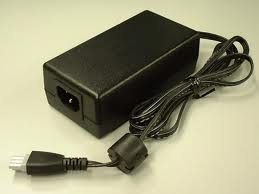
2. If you sure that adapter normal, and all power cable normally too, you must disassemble printer cashing to take mainboard.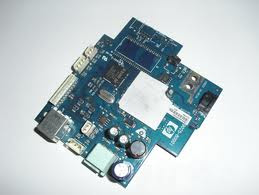
some damage that often occurs :
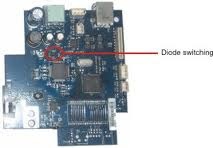
a. Power Diode have been damage, You must replace with the new diode. See the picture bellow
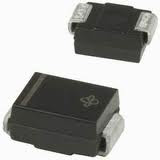 You can change with common type of diode ( for example see picture bellow )
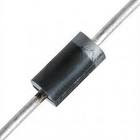 This diode on the main board of HP 3920
b. Main IC have been broke. And you must replace mainboard
I hope this article will be help you
1. Check Adaptor. Be sure that adaptor is normally.

2. If you sure that adapter normal, and all power cable normally too, you must disassemble printer cashing to take mainboard.

some damage that often occurs :
a. Power Diode have been damage, You must replace with the new diode. See the picture bellow
 You can change with common type of diode ( for example see picture bellow )
 This diode on the main board of HP 3920
b. Main IC have been broke. And you must replace mainboard
I hope this article will be help you
Subscribe to:
Comments (Atom)